
A Claude Code plugin · macOS and Linux
Every Claude tab, at a glance.
An AI-written name, a calm color and a live status for every Claude Code session. On a Mac, an island that shows them all.
Terminal.app gets everything, iTerm2 all but Focus mode and the watermark. Ghostty, WezTerm, kitty, Alacritty, VS Code, tmux and Zellij get names, colors and status.
Tabs
Know every tab without clicking.
After your first prompt, Claude Haiku names the session in about two seconds. tabby keeps the title current, so the tab bar tells you what every Claude is doing.
 ColorA calm color no other open session has, with the background tinted to match.
 NameWritten from what you're doing. Rename it any time with
 /tab. StatusWorking, your turn, or needs you. Animated, so it reads from across the room.
- ◐Migrate billingWorkingThe spinner turns while Claude works.
- ✳Fix flaky testYour turnClaude is done and waiting for your next prompt.
- 🔔Refactor authNeeds youA permission or a question. The bell blinks until you answer.
- ⚠Benchmark tokenizerErrorClaude stopped on an error. Worth a look.
Inside Claude too: the status line shows the name, the color and how much context is used, in every terminal.
macOS · Tabby Island
All your sessions, one glance up.
Tabby Island sits at the top of your screen, under the notch. Collapsed, it is one dot per session. It speaks up when a session finishes or needs you.


One line per session: dot, name, status, context. ⌃⌥M switches.
Status chips, how far along a working session is, and the context it has used.
Everything, always: summary, current task, your last prompt, tokens and cost.
Open it with a hover, or ⌃⌥Space.
Every session's name and status, how far along it is, and how much context it has used. A working session shows "2 of 5 tasks · ~3m left" from Claude's task list, or "~2m left · usually 6m" from how long its turns take. Click a row to jump to its tab.
- ⌃⌥Space
- open the island from the keyboard
- ⌃⌥N
- jump to the session that needs you
- ⌃⌥1–9
- jump to a session
- ⌃⌥L
- start a session in a recent folder
- ⌃⌥G
- tile your windows
- ⌃⌥M
- switch the detail level
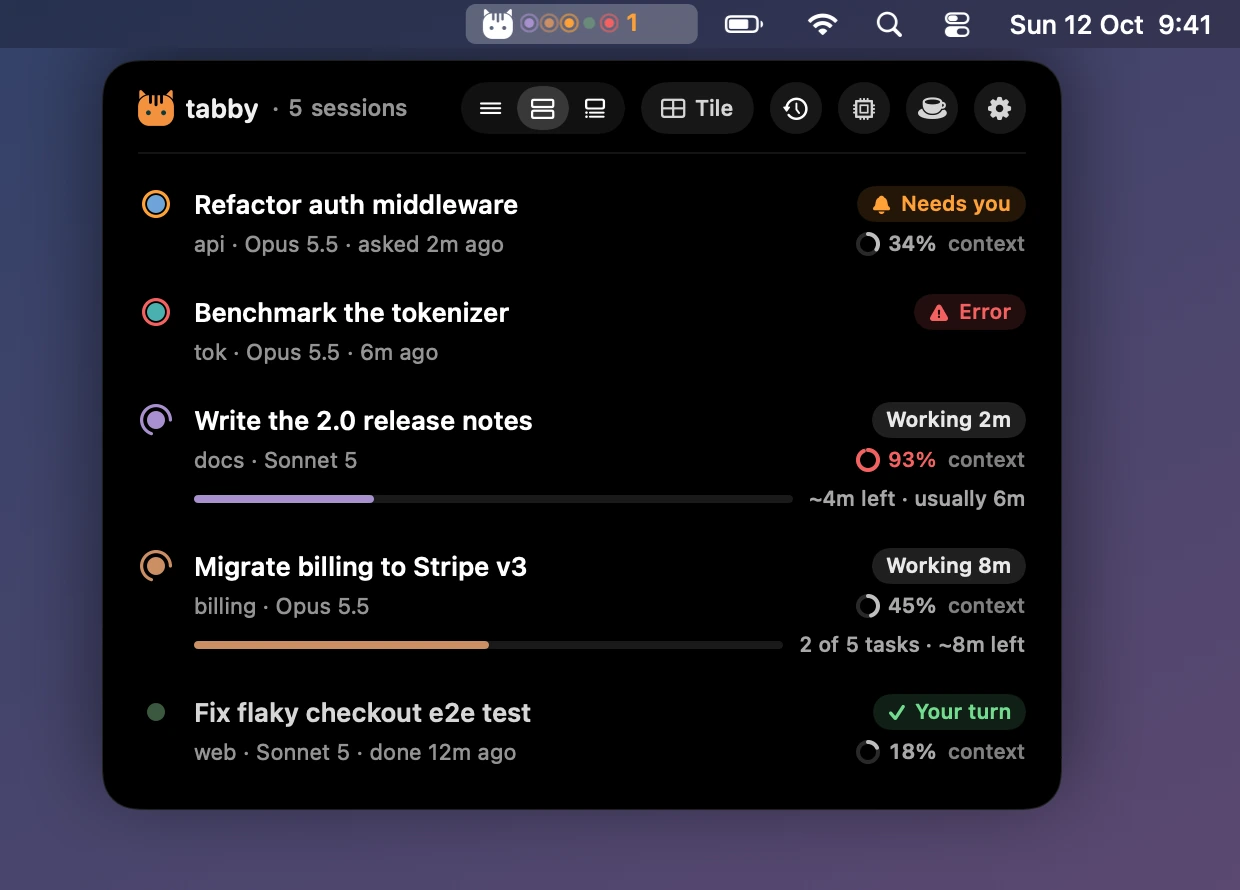
New in 0.5 · Menu bar mode
Rather keep the notch empty?
Choose In the menu bar in Settings. The cat in your menu bar shows a dot per session and how many need you. Click it, and the whole island drops down as a card: every session, page and button. News drops from the icon as a small pill.

tabby island menubar·/tab island notch·Settings › General
-
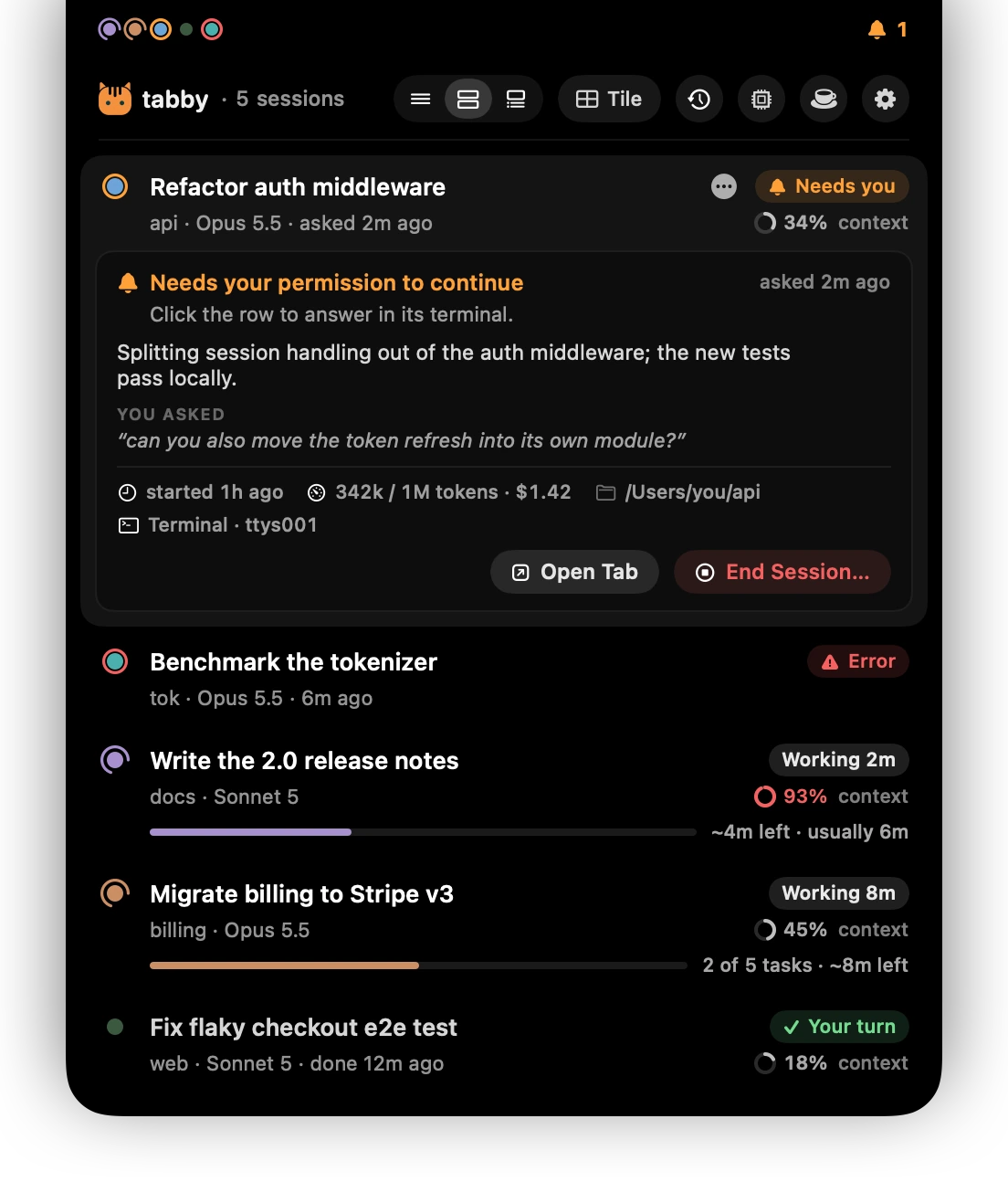
Rest on a session for the full picture.
What it needs and what to do about it, its summary, your last prompt, tokens, cost, folder and terminal. Open Tab jumps there.
-
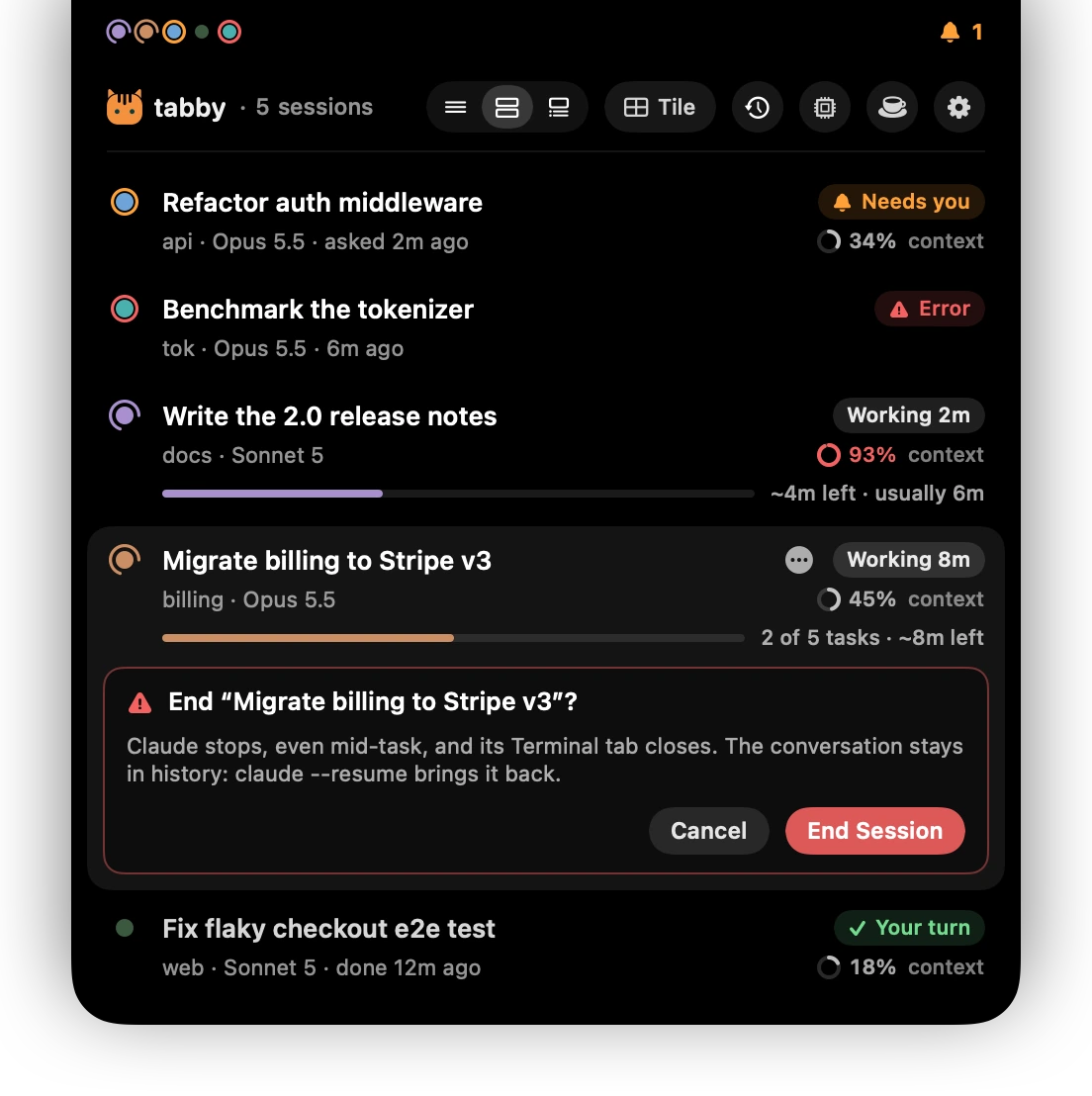
End a session, with a safety catch.
It asks first. The conversation stays in history, so
claude --resumebrings it back. -
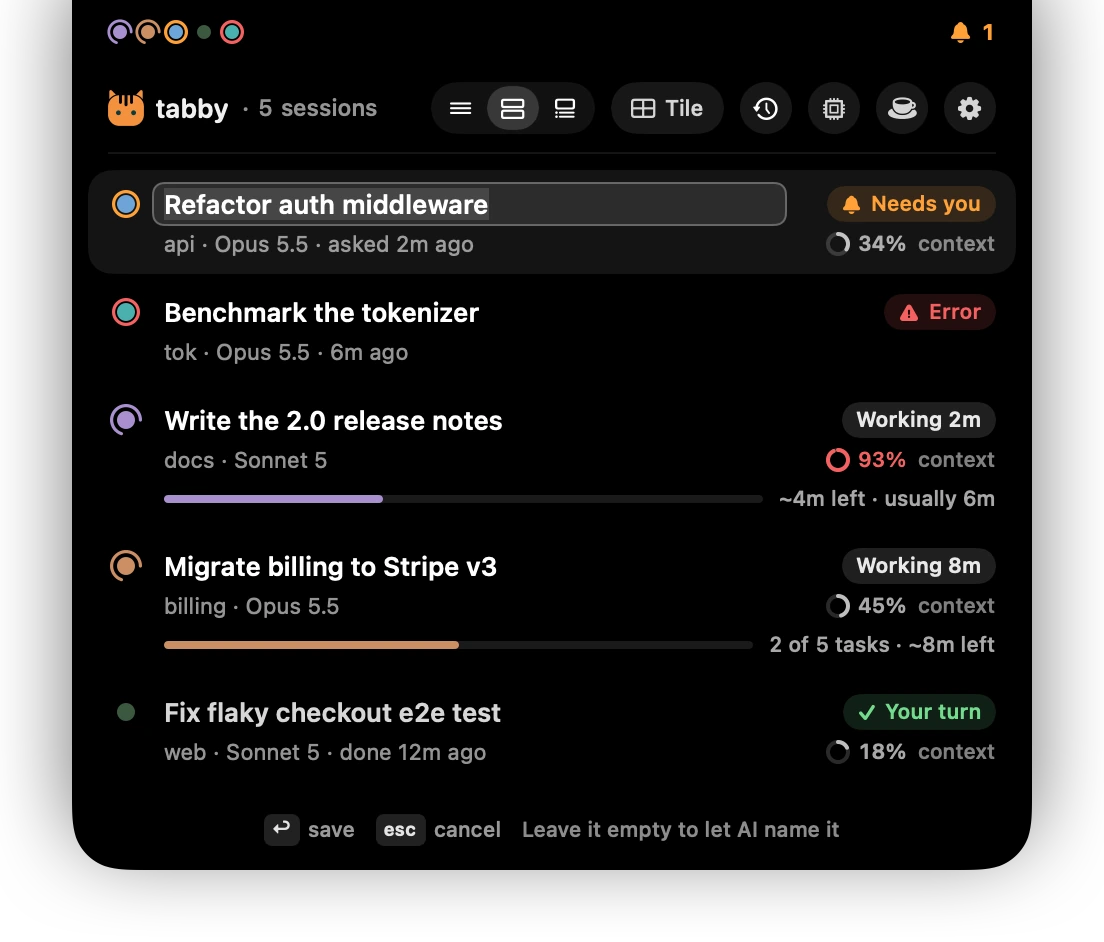
Rename, recolor, re-theme in place.
Right-click a row, or press R, C or T with the keyboard open.
-
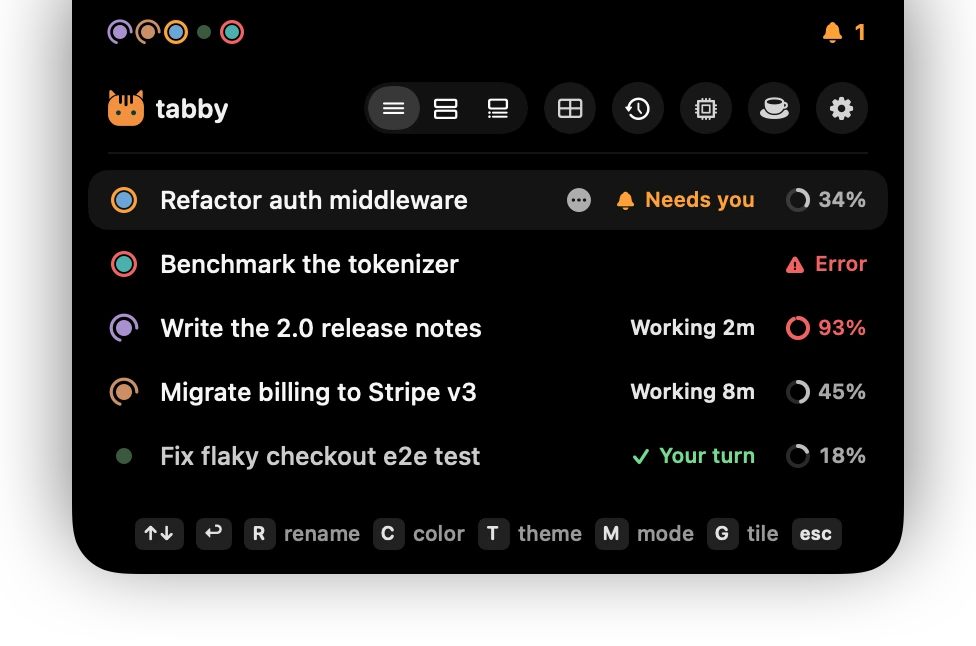
Keyboard first.
⌃⌥Space, then arrows and ↩. Every global shortcut can be changed.
-
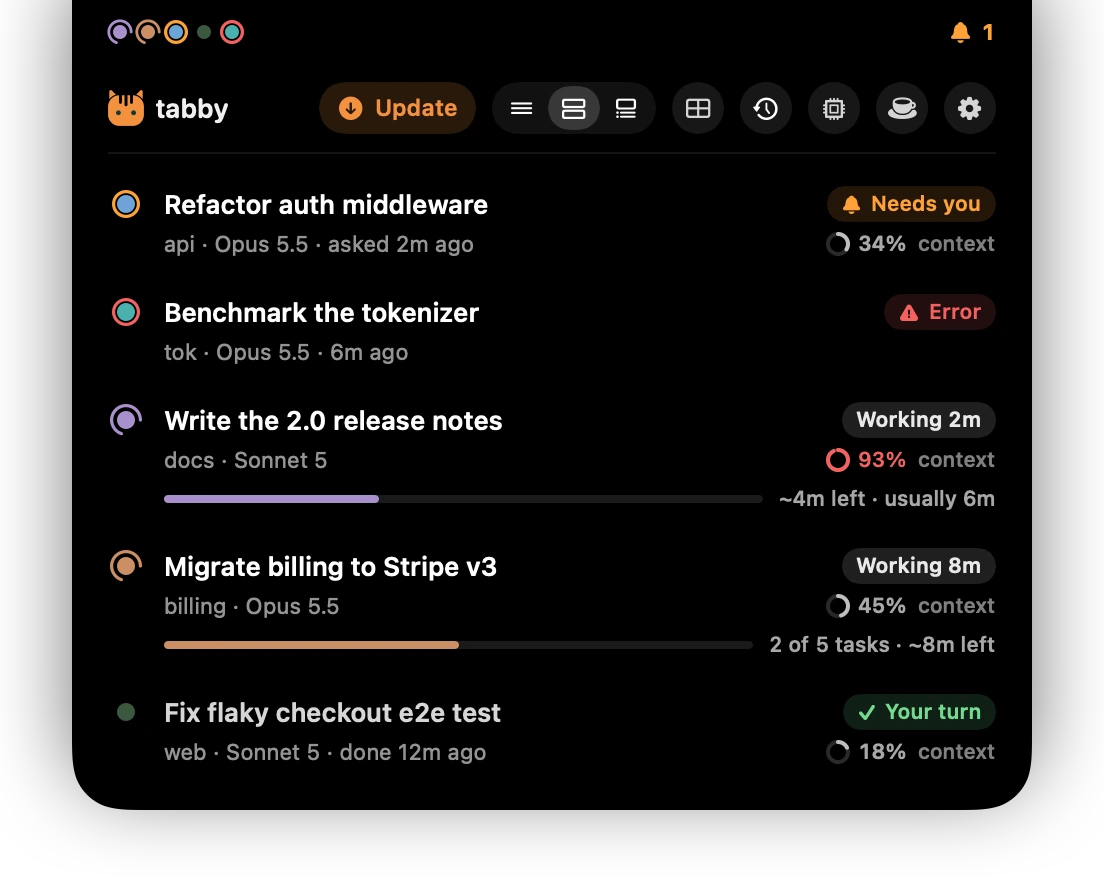
Updates in one click.
When a new version is out, the island shows a button. Or
/tab updatein Claude. It updates the plugin and the island together. -
Under 1% CPU, always.
SwiftUI for layout, Core Animation for anything that loops. Tabby Island idles like a menu-bar clock.
No servers, no telemetry, no accounts, and no network code in the app.
New in 0.5 · Awake
Close the lid. Claude keeps working.
Shut a Mac and it sleeps, and every session stops mid-turn. caffeinate can't help with that one. Pick how long, close the lid, walk away: your Mac goes back to sleep once the last session is done.


/tab awake 4h·/tab awake done·the cup in the island·Keep Awake in the menu-bar menu
-
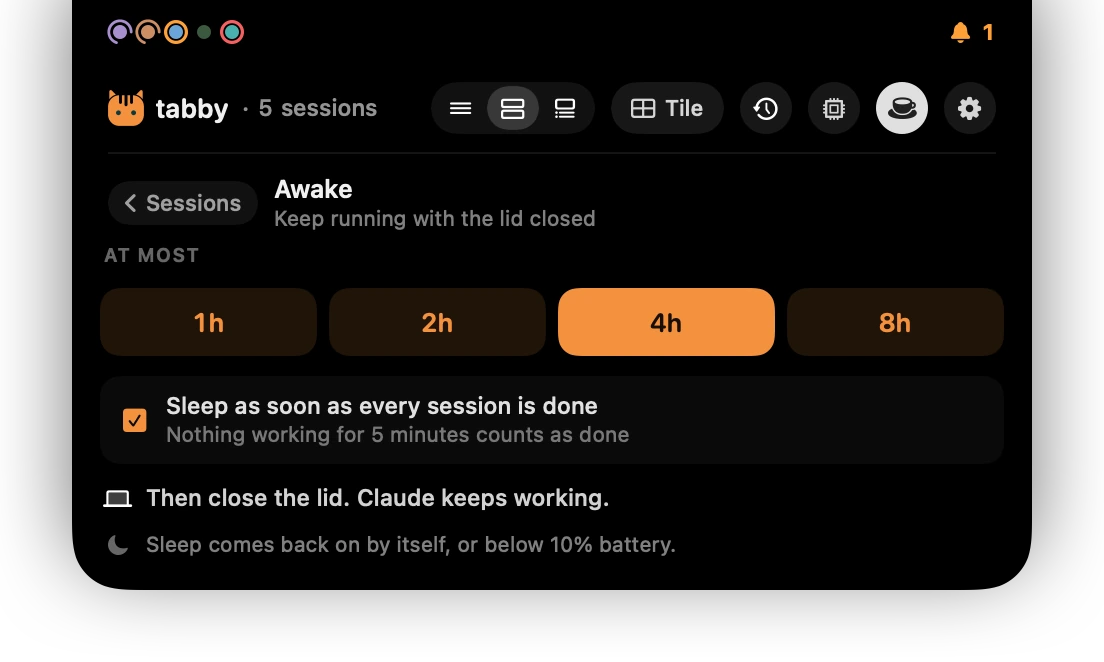
For a while, or until it's done.
Pick 1, 2, 4 or 8 hours. Leave Sleep as soon as every session is done ticked and the hours are only the most it may take.
-
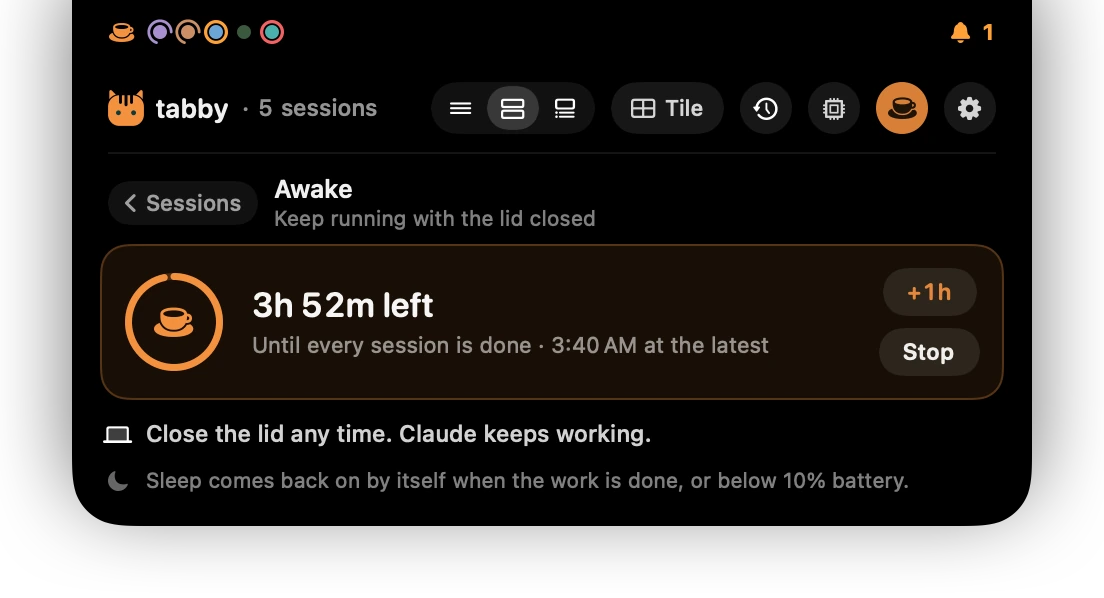
It turns itself off.
Sleep comes back when time's up, when the work is done, or below 10% battery. A crash or a restart never leaves it on.
-
Asks once, does one thing.
Only
pmset disablesleepkeeps a closed Mac awake, and it needs an administrator. macOS asks for your password once; tabby may then run exactly two commands, sleep off and sleep on. Nothing else.tabby awake forgettakes it back.
Focus mode
Five windows, one voice.
With several sessions running, their scrolling output competes for your eyes. Turn on Focus mode, and while Claude works, every Terminal window you're not in shows only its topic and what's running: one line per agent, with a spinner and how long it has been at it. The window opens again the moment Claude needs you or it's your turn. Prefer it calmer still? Tick one box, and a finished window stays covered, with a Your turn button to click.
/tab focus-mode on·Settings › Focus·the menu-bar cat


/tab focus-mode idle on.

Windows
Fill the screen in one key.
⌃⌥G turns tabs into windows and tiles them. Pick how many.
 tabby tile 4
Full-screen windows come back, every session gets its own cell, and a portrait screen stacks them in rows. Tile them all, only the active ones, or the ones you choose. ⌃⌥N jumps to the one that needs you.
-
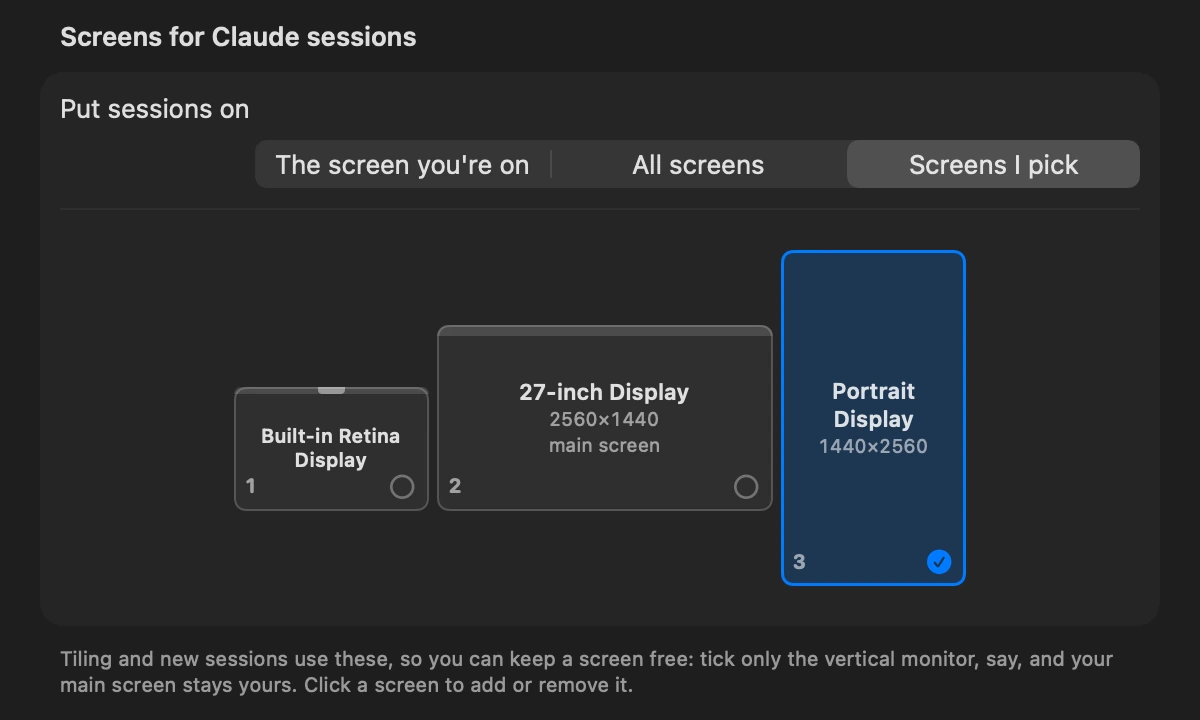
Keep your main screen free.
Choose which screens get sessions: the one you're on, all of them, or the ones you pick. Tick only your vertical monitor, and your main screen stays yours.
-
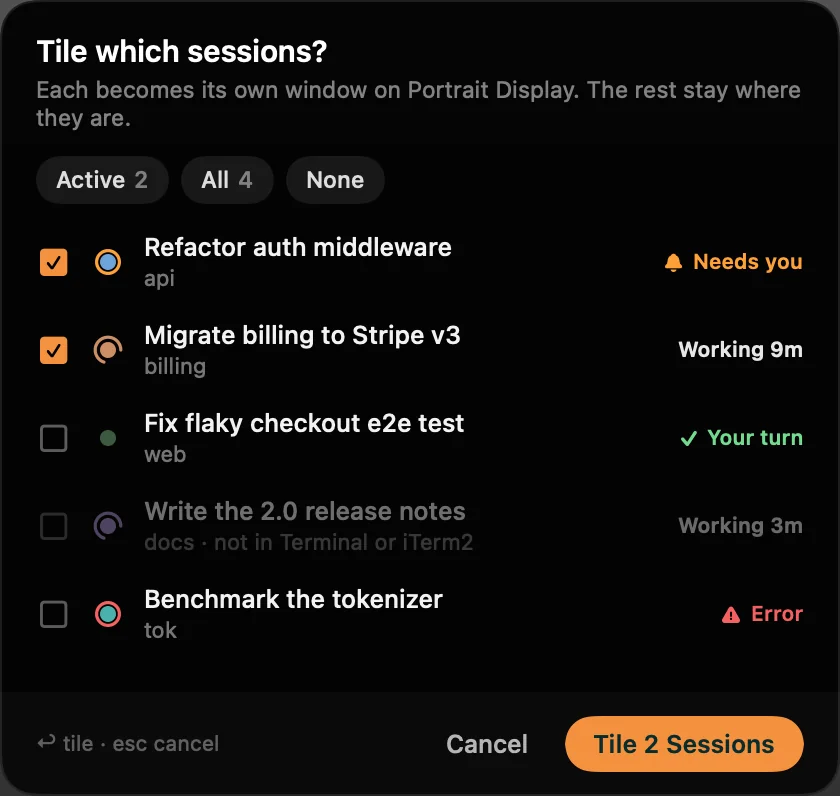
Or pick the sessions.
Active ones, all of them, or checkboxes.
tabby tile --activedoes the same from a terminal. -
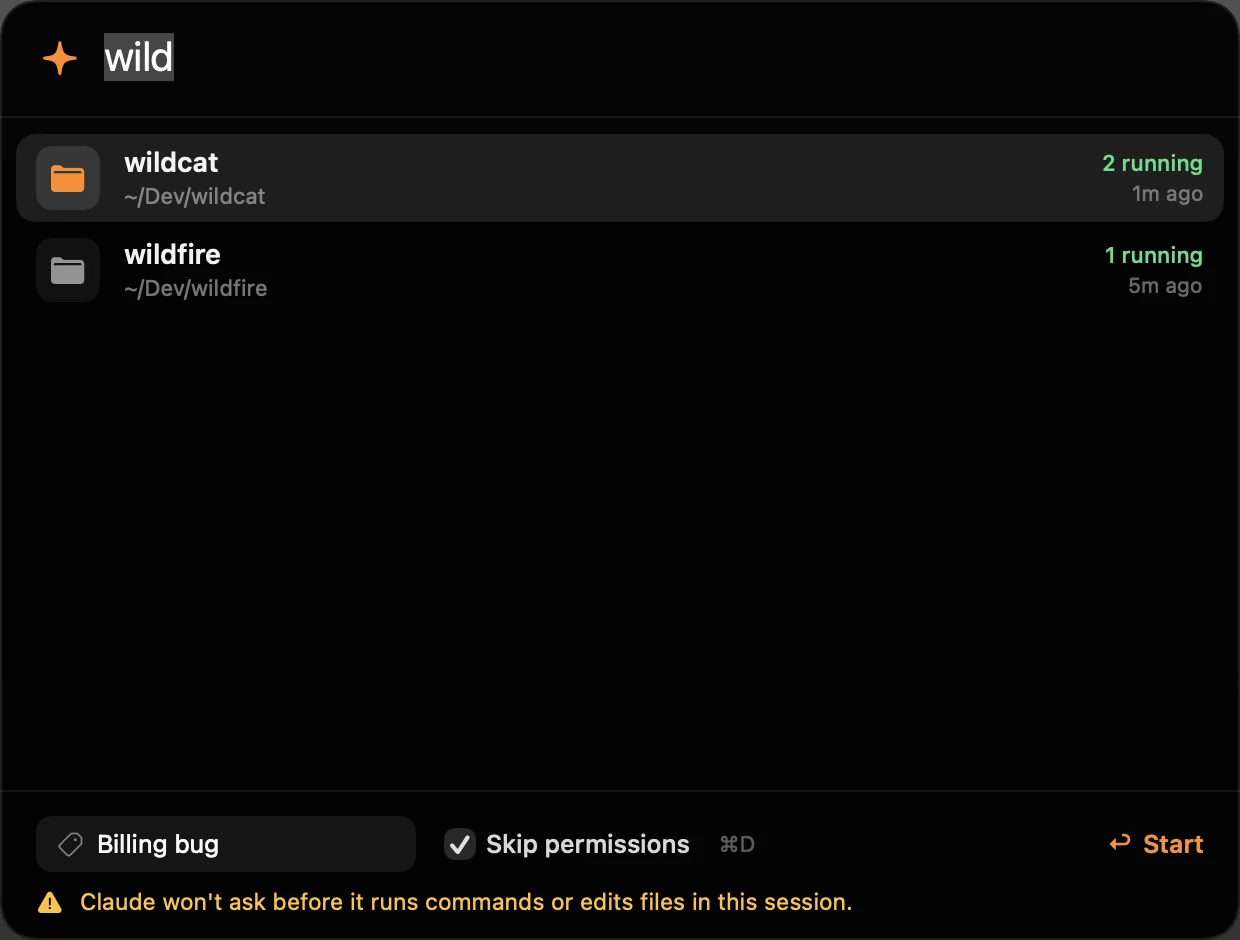
A new session in two keystrokes.
⌃⌥L lists your recent and most-used folders. Type to filter, name it if you like, press ↩. It opens on the screen you chose.
/tab
One line of control.
/tab is answered by a hook, so it's instant and never costs tokens. The same words work as tabby in a terminal, and as flags when you launch Claude.
/tab note waiting on design/tab tile active/tab focus-mode on/tab focus-mode idle on/tab watermark off/tab next/tab update/tab offtabby doctor
Themes
57 calm themes, contrast-checked.
Text reads at WCAG AA or better in every theme, and 46 of them reach AAA. A session's tint never makes it harder to read. Read the audit
- ❯ claudeRefactor authContrast
- Text
- 11.71:1
- Rating
- AAA
- Claude UI
- 84%
- Mode
- dark
- ❯ claudeRefactor authContrast
- Text
- 9.25:1
- Rating
- AAA
- Claude UI
- 58%
- Mode
- dark
- ❯ claudeRefactor authContrast
- Text
- 12.07:1
- Rating
- AAA
- Claude UI
- 84%
- Mode
- dark
- ❯ claudeRefactor authContrast
- Text
- 13.39:1
- Rating
- AAA
- Claude UI
- 83%
- Mode
- dark
- ❯ claudeRefactor authContrast
- Text
- 11.26:1
- Rating
- AAA
- Claude UI
- 77%
- Mode
- dark
- ❯ claudeRefactor authContrast
- Text
- 10.59:1
- Rating
- AAA
- Claude UI
- 80%
- Mode
- dark
- ❯ claudeRefactor authContrast
- Text
- 11.34:1
- Rating
- AAA
- Claude UI
- 76%
- Mode
- dark
- ❯ claudeRefactor authContrast
- Text
- 7.38:1
- Rating
- AAA
- Claude UI
- 58%
- Mode
- dark
- ❯ claudeRefactor authContrast
- Text
- 10.2:1
- Rating
- AAA
- Claude UI
- 89%
- Mode
- dark
- ❯ claudeRefactor authContrast
- Text
- 8.13:1
- Rating
- AAA
- Claude UI
- 69%
- Mode
- dark
- ❯ claudeRefactor authContrast
- Text
- 11.98:1
- Rating
- AAA
- Claude UI
- 91%
- Mode
- dark
- ❯ claudeRefactor authContrast
- Text
- 10.6:1
- Rating
- AAA
- Claude UI
- 84%
- Mode
- dark
- ❯ claudeRefactor authContrast
- Text
- 13.78:1
- Rating
- AAA
- Claude UI
- 85%
- Mode
- dark
- ❯ claudeRefactor authContrast
- Text
- 11.12:1
- Rating
- AAA
- Claude UI
- 90%
- Mode
- light
- ❯ claudeRefactor authContrast
- Text
- 10.87:1
- Rating
- AAA
- Claude UI
- 81%
- Mode
- light
- ❯ claudeRefactor authContrast
- Text
- 6.57:1
- Rating
- AA
- Claude UI
- 66%
- Mode
- dark
- ❯ claudeRefactor authContrast
- Text
- 13.54:1
- Rating
- AAA
- Claude UI
- 86%
- Mode
- dark
- ❯ claudeRefactor authContrast
- Text
- 21:1
- Rating
- AAA
- Claude UI
- 100%
- Mode
- dark
/tab theme nord·one tab/tab theme nord all·every tabtabby themes·preview all 57
Settings
Every knob, one window.
The island's cog, the menu-bar cat, or ⌃⌥,. Tab names, tint, markers, the watermark, Focus mode, screens, shortcuts and permissions.


Let Claude install it.
 Paste this into Claude Code. Claude shows you the terms, installs tabby, and walks you through the Mac permissions.
 tabby uninstall undoes everything it changes.

>Install tabby for me: run curl -fsSL https://claude-tabby.vercel.app/install.md and follow it.
Or in a terminal
curl -fsSL https://claude-tabby.vercel.app/install | bash
Or with Claude Code’s /plugin
/plugin marketplace add 0xNtive/tabby
/plugin install tabby@tabby
/reload-plugins
/tabby:setup
Needs Claude Code on macOS or Linux; Node.js is set up for you if it’s missing. About 15 seconds, and the sessions you already have open light up too, with no restart. Something off? Ask Claude to “fix tabby”.

Questions, answered.
Does it cost anything?
No. tabby is free and MIT licensed. Tab names come from Claude Haiku through your own Claude Code login, about 500 tokens each, which Pro and Max cover.
What leaves my machine?
One thing you typed: to name a tab, tabby sends that session's last few prompts (trimmed), a short excerpt of Claude's last reply and the project folder's name to Claude Haiku, through your own Claude Code login and the provider it already uses. Type /tab namer heuristic and names are worked out on your machine instead. Besides that, tabby asks github.com for a newer release every few hours and downloads Tabby Island from GitHub's releases; neither sends anything about you, and the check can be turned off. No servers, no telemetry, no accounts. Tabby Island has no network code at all, and tabby's files in ~/.claude/tabby are readable only by you.
Is it safe to install?
tabby is open source with no dependencies, so everything it runs is in the repository. The installer shows the terms first, backs up your Claude settings before changing them, and tabby uninstall reverts every change. The naming call runs with no tools, no hooks and no plugins, so it can only return a name. Tabby Island asks for Accessibility and Automation only to arrange windows, find each session's window and jump to tabs; it never reads your screen or what you type. It is in beta and not yet notarized by Apple, so tabby checks it itself: every Tabby Island download is signed by the release workflow, and one whose signature doesn't match is thrown away before it's opened.
I already have Claude sessions open. Do I restart them?
No. Setup reaches the sessions that are already open: each gets its color right away, and its name, status and /tab with its next prompt. Claude Code loads a plugin only when a session starts, so tabby adds its hooks to your Claude settings for those sessions, and takes them out again once they've all ended.
How do I update?
When a new version is out, the island shows an Update button. Or type /tab update in Claude, or run tabby update in a terminal. It updates the plugin and the island together.
Can Claude keep working with the lid closed?
Yes, with Awake. Click the cup in the island (or type /tab awake 4h), pick how long, and close the lid. A Mac normally sleeps when it's closed, whatever caffeinate says. Leave "Sleep as soon as every session is done" ticked and it sleeps again as soon as the work is done; it also comes back on when the time is up or below 10% battery.
What does Awake change on my Mac?
Only pmset disablesleep keeps a closed Mac awake, and it needs an administrator. The first time, macOS asks for your password once, and tabby adds a rule to /etc/sudoers.d that lets your user run exactly two commands without a password: sleep off and sleep on. Nothing else runs as root. tabby awake forget takes it back.
Can I hide the island?
Yes: choose In the menu bar in Settings › General, or type /tab island menubar. Nothing sits at the notch any more; the cat in the menu bar shows your sessions as dots, and a click drops the whole list down.
Which terminals work?
Terminal.app gets everything: names, colors and status, jumping to a tab, tiling, Focus mode and the watermark. iTerm2 gets all of it but Focus mode and the watermark, with its own tab colors; tiling moves its windows but doesn't split tabs. Ghostty, WezTerm, kitty, Alacritty, VS Code, Cursor, tmux and Zellij get names, colors and live status, and Warp and GNU screen get names and status. Tabby Island lists sessions from any of them, and the status line inside Claude works everywhere.
Why does tiling ask for Accessibility?
Moving a tab into its own window and bringing a full-screen window back use macOS window controls. tabby asks once, for Tabby Island, and never records your screen.
Something isn't working?
Ask Claude to “fix tabby”: it runs tabby doctor, which checks every part of the install, and fixes what it finds. Running the installer again is safe too.
How do I turn it off?
Type /tab off for one tab, or run tabby uninstall to revert every change. Your Claude settings file is backed up first.
Is this made by Anthropic?
No. tabby is an independent open source project. Claude is a trademark of Anthropic.
Saves you a glance? Star it.
tabby is free, MIT licensed and built in the open. A star on GitHub is how other Claude Code users find it.
Star tabby on GitHub